
ViceX Background

Loading Webstore · FiveM Scripts

[HudV3 Neon]esx  {ESCROW}
[HudV3 Neon]esx  {ESCROW}
Video Thumbnail

€27.00 ** Include your country fee
Accepted Payments
Paypal Stripe Crypto Bank Cash Other Bank +50

You have different question? Discord

 ViceX Studios · HUD v3 Neon   ESX Only · Neon Cloud HUD 
Notifications · TextUI · Full HUD Control

vicexstudios_hudv3 – Neon Grand RP Style HUD for ESX

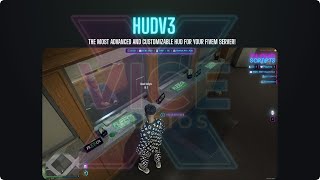
vicexstudios_hudv3 is a full neon HUD and notification system for ESX servers. It replaces the default ESX UI with a modern, Grand RP inspired design: time & date line, postal & street info, ID and player count, cash & bank, hunger & thirst circles, vehicle HUD, voice range UI and built-in notifications & TextUI – all in one optimized resource.

Designed in the ViceX Studios neon style with Bebas Neue fonts, cyan/pink glow and clean alignment, it fits perfectly into high-quality roleplay servers that want a professional, streamer-ready HUD.

HUD Snapshot
Neon HUD with time, date, postal & street
Circular hunger & thirst bars + seatbelt warning
Vehicle HUD with digital speed, fuel & engine
Voice range UI, notifications & TextUI exports

Key Features

Full Neon HUD Layout
Top-center bar for time, date, postal, street and zone, right-side block for player ID, online players and job label, and a cash/bank section with money icons and neon gradient background. Everything is styled through CSS variables for quick color changes.
Built-in Notification System
Neon notification cards with title + two lines, animated loading bar and types: success, error, info, warning, sms, event. Trigger them via: TriggerEvent('vicexstudios_hudv3:notify', title, msg1, msg2, type) or the export exports['vicexstudios_hudv3']:notify(...).
Neon TextUI for Interactions
Show clean interaction prompts like “Press [E] to interact” with: TriggerEvent('vicexstudios_hudv3:showUI', message) or exports['vicexstudios_hudv3']:ShowUI(message), and hide them with hideUI. Perfect for integrating jobs, garages, shops and more.
Circular Hunger & Thirst + Seatbelt Warning
Two animated SVG circles show hunger and thirst based on ESX status. A seatbelt warning icon with pulse animation is displayed above the circles, connected to a built-in seatbelt system (toggle event, anti-eject options and ESX notifications).
Greenzones & Redzones with Rules
Configure polygon-based Greenzones and Redzones in Config.Greenzones and Config.Redzones. In Greenzones you can optionally disable damage, drive-bys and shooting, show safe-zone notifications and add your own events for city rules.
Advanced Voice Range UI & Ground Marker
Integrated voice UI for whisper / normal / shout ranges with a neon mic icon, key letter, and optional ground marker circle. Works with saltychat, mumble-voip or pma-voice depending on your config.
Vehicle HUD & Weapon Panel
A bottom-right vehicle HUD shows a digital KMH speedometer, fuel bar and engine health bar. When armed, a weapon panel displays icon and ammo (clip / reserve), using ESX weapon data and weapon images from the HUD’s icon set.

ESX-Only Integration

  • Framework: built for ESX (es_extended) only – no QB-Core code inside.
  • Statuses: uses esx_status for hunger and thirst, updating the neon circles in real time.
  • Money & Bank: fetched from ESX accounts and displayed in the cash/bank panel.
  • Job info: shows job label and grade (e.g. “Police: Officer”) from ESX PlayerData.
  • Postal & street names: reads new-postals.json and GTA zone data to display clean street & zone names.
  • Pause menu: HUD fades out when the Rockstar pause menu is open and comes back when closed.

Admin Tools & Developer API

  • Admin notify commands: /notify (all players) and /notifyid (single ID), protected by ACE vicexstudioshudv3.notify.
  • Exports: exports['vicexstudios_hudv3']:notify(...), ShowUI(message), HideUI() for easy integration into any ESX script.
  • HUD control: events to show/hide the full HUD for cutscenes, intro sequences or screenshots.
  • ESX override: you can route ESX notifications & TextUI into HUD v3 by editing es_extended/client/functions.lua using the examples from the included README.

Requirements

  • FiveM server with ESX (es_extended) framework.
  • esx_status for hunger & thirst (recommended).
  • Optional: saltychat, mumble-voip or pma-voice for voice range integration.
  • Optional: your own icon set if you want to replace the default weapon / HUD icons.

Quick Installation

  1. Drag & drop the vicexstudios_hudv3 folder into your resources directory.
  2. Configure config.lua (language, date format, voice system, Greenzones/Redzones, keybinds, etc.).
  3. Optionally integrate notifications & TextUI into ESX using the README instructions.
  4. Add this line to your server.cfg:
    ensure vicexstudios_hudv3
  5. Restart your server and enjoy a complete neon HUD experience on your ESX city.
Give your ESX server a true ViceX neon HUD

Install vicexstudios_hudv3 and replace boring default UI with a full neon HUD: notifications, TextUI, voice range, status circles, Greenzones/Redzones, vehicle HUD and admin tools – all in one clean, optimized resource made for ESX only.

About Our Services

immersive and optimized content

2200+ Customers

We've proudly served over 2 ,200 satisfied customers with our quality products.

Optimized Resource

Our scripts are optimized for maximum performance so your server runs smooth.

Refund Guarantee

All of our resource have a 24-hour refund guarantee so you can buy with confidence.

Package 1

€20.00

Package 1

€22.00

Package 1

€25.00