

Loading Webstore · FiveM Scripts
Loading Webstore · FiveM Scripts
![[Notification]standalone {ESCROW}](https://dunb17ur4ymx4.cloudfront.net/packages/images/4160da24eb8ddfd5860606ad8013e4b10908ff5f.jpg)
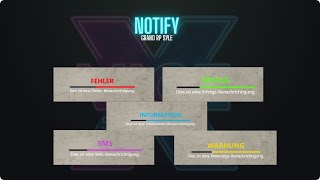
vicexstudios_notification is a clean, Grand RP inspired NUI notification system for FiveM. It shows centered neon notifications with a bold title, animated loading bar and message – perfect for admin messages, system info, SMS-style alerts and more.
Fully script-friendly with exports and events, a built-in queue system and type-based colors, it plugs into any ESX, QBCore or standalone server in just a few lines.
info, success, error, warning, sms. Each type has its own neon color and updates the loading bar and title color automatically.exports['vicexstudios_notification']:notify(type, title, message, time, position)TriggerEvent('vicexstudios_notification:notify', type, title, message, time, position). Works with ESX, QBCore and standalone resources.error, warning, success or falls back to info. Time and position parameters are optional (defaults to 3000 ms and “right”)./notify_info, /notify_success, /notify_error, /notify_warning, /notify_sms. Perfect to show staff how the system looks and behaves in-game.position parameter ("left" or "right") while still staying centered at the bottom. This allows you to adapt the look depending on other UI elements on your server.Client-side examples using the export:
exports['vicexstudios_notification']:notify("system",  "System",      "System notification message",      4000, "right")
exports['vicexstudios_notification']:notify("info",    "Information", "Information notification message", 4000, "left")
exports['vicexstudios_notification']:notify("success", "Success",    "Success notification message",     4000, "right")
exports['vicexstudios_notification']:notify("error",   "Error",      "Error notification message",       4000, "left")
exports['vicexstudios_notification']:notify("warning", "Warning",    "Warning notification message",     4000, "right")
exports['vicexstudios_notification']:notify("sms",     "SMS",        "SMS notification message",         4000, "left")
Server-side examples using commands / triggers:
-- send to one player from server
TriggerClientEvent('vicexstudios_notification:notify', source,
"success", "Success", "This is a success notification.", 4000, "right")style.css to match your server theme.vicexstudios_notification folder to your resources directory.server.cfg:ensure vicexstudios_notification/notify_info, /notify_success, etc.) or call the export from your scripts to start using the system.Install vicexstudios_notification and replace boring default messages with a polished, neon Grand RP style notify system – perfect for admin tools, jobs, systems and every script in the ViceX Studios ecosystem.
We've proudly served over 2 ,200 satisfied customers with our quality products.
Our scripts are optimized for maximum performance so your server runs smooth.
All of our resource have a 24-hour refund guarantee so you can buy with confidence.

€20.00

€22.00

€25.00